How to Set Up OpenTelemetry® Profiling on a Local Kubernetes Cluster
- Profiling
- Kubernetes
- OpenTelemetry
The smallest working continuous profiling pipeline we know of: the OpenTelemetry eBPF profiler on a local kind cluster, sending flame graphs to Grafana's otel-lgtm stack, plus the one setting kind needs that a cloud cluster does not.

Traces tell you which request was slow. Metrics tell you that CPU usage went up. Neither tells you which function burned the CPU. That question belongs to profiles, the fourth OpenTelemetry signal, which entered public Alpha in March 2026. The OpenTelemetry eBPF profiler answers it for every process on a Linux node without touching application code, and it now ships as a regular Collector distribution.
At OllyGarden, we continuously profile our own Go services, and we recently moved that setup to OpenTelemetry profiling. We did it for two reasons. It shows us, function by function, where our running services spend their CPU, and it is the best way we know to build practical knowledge of an emerging technology before we advise anyone else on it. This post collects some of what we learned in the process, and shows how you can get the same result on your own machine.
One caution before you start: profiling in OpenTelemetry is still Alpha, and not every observability vendor can ingest OpenTelemetry Protocol (OTLP) profiles yet. That includes most of the platforms that market themselves as "OTel-native". Check that your backend accepts the signal before planning anything beyond a local experiment.
The fastest way to understand what profiling gives you is to run it. This post sets up the smallest working pipeline we know of: a local kind cluster, the eBPF profiler as a DaemonSet, and Grafana's all-in-one otel-lgtm image as the backend. Plain kubectl apply, no Helm, no custom images, about ten minutes end to end. Along the way we cover the one setting kind needs that a cloud cluster does not, because that is where most first attempts stall.
What we are building
The eBPF profiler runs as one pod per node and samples the stacks of every process on that node. Its k8s_attributes processor matches each process to its pod through the container ID and adds the namespace, pod, deployment, and service.name. The profiler then exports OTLP profiles over gRPC to the otel-lgtm container, whose own Collector forwards them to Pyroscope, and Grafana renders them as flame graphs.
- kind node Every process on the node
- eBPF profiler DaemonSet, adds Kubernetes metadata
- otel-lgtm Collector OTLP over gRPC on port 4317
- Pyroscope Stores the profiles
- Grafana Renders flame graphs
We pin the profiler to otel/opentelemetry-collector-ebpf-profiler:0.163.2 and the backend to grafana/otel-lgtm:0.38.1. The version choice is deliberate. The OTLP profiles protocol is still in Development, and otel-lgtm 0.38.1 runs Collector 0.163.2 internally, so matching the profiler to it avoids any wire-format surprises between the two. When you upgrade one, upgrade the other.
You need Docker, kind, and kubectl on a Linux machine with kernel 5.10 or newer. The profiler loads eBPF programs into the kernel the containers share, so macOS and Windows hosts work only through a Linux VM such as the one Docker Desktop runs.
Create the cluster and the backend
The cluster needs nothing special:
kind: Cluster
apiVersion: kind.x-k8s.io/v1alpha4
name: otel-profiling
kind create cluster --config kind.yaml
kind names the kubeconfig context kind-otel-profiling. Every command below passes it explicitly, which is a good habit on any machine that talks to more than one cluster.
The backend is a trimmed version of the manifest in the otel-lgtm repository, pinned to a release instead of latest and exposing only Grafana and the OTLP ports:
apiVersion: v1
kind: Namespace
metadata:
  name: observability
---
apiVersion: v1
kind: Service
metadata:
  name: lgtm
  namespace: observability
spec:
  selector:
    app: lgtm
  ports:
    - name: grafana
      port: 3000
    - name: otlp-grpc
      port: 4317
    - name: otlp-http
      port: 4318
---
apiVersion: apps/v1
kind: Deployment
metadata:
  name: lgtm
  namespace: observability
spec:
  replicas: 1
  selector:
    matchLabels:
      app: lgtm
  template:
    metadata:
      labels:
        app: lgtm
    spec:
      containers:
        - name: lgtm
          image: grafana/otel-lgtm:0.38.1
          ports:
            - containerPort: 3000
            - containerPort: 4317
            - containerPort: 4318
          readinessProbe:
            exec:
              command: [cat, /tmp/ready]
kubectl --context kind-otel-profiling apply -f lgtm.yaml
kubectl --context kind-otel-profiling -n observability rollout status deploy/lgtm --timeout=5m
The otel-lgtm Collector already starts with the service.profilesSupport feature gate and has a profiles pipeline from its OTLP receiver to Pyroscope, so there is nothing to configure on this side.
Deploy something worth profiling
An idle cluster produces flame graphs full of kubelet and containerd. To see what the profiler does for an application, deploy one that spends its CPU somewhere recognizable. This one is a Python "checkout" service with two expensive steps, a recursive pricing rule and a receipt signature that hashes in a loop:
apiVersion: v1
kind: Namespace
metadata:
  name: shop
---
apiVersion: v1
kind: ConfigMap
metadata:
  name: checkout
  namespace: shop
data:
  app.py: |
    import hashlib
    import time


    def apply_discounts(items):
        # Naive recursion stands in for an expensive pricing rule.
        def tier(n):
            return n if n < 2 else tier(n - 1) + tier(n - 2)
        return sum(tier(18 + item % 4) for item in items)


    def sign_receipt(order_id):
        digest = str(order_id).encode()
        for _ in range(5000):
            digest = hashlib.sha256(digest).digest()
        return digest.hex()


    def handle_order(order_id):
        items = range(order_id % 5 + 1)
        apply_discounts(items)
        sign_receipt(order_id)


    order_id = 0
    while True:
        for _ in range(20):
            order_id += 1
            handle_order(order_id)
        time.sleep(0.1)
---
apiVersion: apps/v1
kind: Deployment
metadata:
  name: checkout
  namespace: shop
spec:
  replicas: 1
  selector:
    matchLabels:
      app: checkout
  template:
    metadata:
      labels:
        app: checkout
    spec:
      containers:
        - name: checkout
          image: python:3.13-slim
          command: [python, -u, /app/app.py]
          resources:
            requests:
              cpu: 100m
              memory: 64Mi
            limits:
              cpu: 500m
              memory: 128Mi
          volumeMounts:
            - name: app
              mountPath: /app
      volumes:
        - name: app
          configMap:
            name: checkout
kubectl --context kind-otel-profiling apply -f checkout.yaml
Note what is missing: no SDK, no agent, no environment variables. The service has no idea it is about to be profiled.
Deploy the eBPF profiler
Here is the complete profiler manifest. The sections after it walk through each part.
apiVersion: v1
kind: Namespace
metadata:
  name: profiling
---
apiVersion: v1
kind: ServiceAccount
metadata:
  name: otel-ebpf-profiler
  namespace: profiling
---
apiVersion: rbac.authorization.k8s.io/v1
kind: ClusterRole
metadata:
  name: otel-ebpf-profiler
rules:
  - apiGroups: [""]
    resources: [pods, namespaces]
    verbs: [get, list, watch]
  - apiGroups: [apps]
    resources: [replicasets]
    verbs: [get, list, watch]
---
apiVersion: rbac.authorization.k8s.io/v1
kind: ClusterRoleBinding
metadata:
  name: otel-ebpf-profiler
roleRef:
  apiGroup: rbac.authorization.k8s.io
  kind: ClusterRole
  name: otel-ebpf-profiler
subjects:
  - kind: ServiceAccount
    name: otel-ebpf-profiler
    namespace: profiling
---
apiVersion: v1
kind: ConfigMap
metadata:
  name: otel-ebpf-profiler
  namespace: profiling
data:
  config.yaml: |
    receivers:
      profiling:
        # kind nodes are containers: pods live in nested PID namespaces.
        pid_namespace_translation_mode: auto
    processors:
      memory_limiter:
        check_interval: 1s
        limit_mib: 800
        spike_limit_mib: 200
      k8s_attributes:
        filter:
          node_from_env_var: K8S_NODE_NAME
        pod_association:
          - sources:
              - from: resource_attribute
                name: container.id
        extract:
          metadata:
            - k8s.namespace.name
            - k8s.pod.name
            - k8s.deployment.name
            - k8s.node.name
            - k8s.container.name
            - service.name
      resource:
        attributes:
          - key: k8s.cluster.name
            value: kind-otel-profiling
            action: upsert
    exporters:
      debug:
        verbosity: basic
      otlp_grpc:
        endpoint: lgtm.observability.svc:4317
        tls:
          insecure: true
    service:
      pipelines:
        profiles:
          receivers: [profiling]
          processors: [memory_limiter, k8s_attributes, resource]
          exporters: [otlp_grpc, debug]
---
apiVersion: apps/v1
kind: DaemonSet
metadata:
  name: otel-ebpf-profiler
  namespace: profiling
spec:
  selector:
    matchLabels:
      app.kubernetes.io/name: otel-ebpf-profiler
  template:
    metadata:
      labels:
        app.kubernetes.io/name: otel-ebpf-profiler
    spec:
      serviceAccountName: otel-ebpf-profiler
      hostPID: true
      tolerations:
        - operator: Exists
      containers:
        - name: profiler
          image: otel/opentelemetry-collector-ebpf-profiler:0.163.2
          args:
            - --config=/conf/config.yaml
            - --feature-gates=+service.profilesSupport
          env:
            - name: K8S_NODE_NAME
              valueFrom:
                fieldRef:
                  fieldPath: spec.nodeName
          securityContext:
            privileged: true
          resources:
            requests:
              cpu: 100m
              memory: 256Mi
            limits:
              memory: 1Gi
          volumeMounts:
            - name: conf
              mountPath: /conf
            - name: tracefs
              mountPath: /sys/kernel/tracing
      volumes:
        - name: conf
          configMap:
            name: otel-ebpf-profiler
        - name: tracefs
          hostPath:
            path: /sys/kernel/tracing
kubectl --context kind-otel-profiling apply -f profiler.yaml
kubectl --context kind-otel-profiling -n profiling rollout status ds/otel-ebpf-profiler
What the profiler needs from the node
The profiler is not a normal workload. It loads eBPF programs and reads the memory maps of processes it does not own, so it runs privileged with hostPID: true. It also needs tracefs at /sys/kernel/tracing to attach its scheduler tracepoints, and a container gets a fresh /sys without it, which is why the manifest mounts it from the host. The toleration lets it run on every node, including tainted control-plane nodes, since a profiler that skips nodes leaves blind spots.
The pipeline
The profiles pipeline reads like any other Collector pipeline, with a few profile-specific details. The --feature-gates=+service.profilesSupport argument is mandatory; without it the Collector refuses to start a profiles pipeline at all. memory_limiter uses absolute limit_mib values on purpose: in a privileged pod with the host PID namespace, percentage limits resolve against the node's memory rather than the container limit. There is no batch processor, because it does not support profiles yet, and the receiver already batches on its own reporting interval.
k8s_attributes does the work that makes the data useful. The profiler sees processes, not pods, so the processor associates each one with a pod through container.id instead of the usual pod IP, and only watches pods on its own node. It then derives service.name from the workload, which is how the Python process above shows up as checkout instead of python3.13. Deriving the deployment name goes through the owning ReplicaSet, hence the extra RBAC rule.
The debug exporter is there for the first run. Once the data shows up in Grafana, remove it.
What is different on kind
One setting in the manifest exists only because kind nodes are themselves Docker containers: pid_namespace_translation_mode: auto. On EKS, GKE, AKS, or a bare-metal kubelet, you can drop it. With hostPID: true on a real node, the profiler lands in the kernel's root PID namespace and sees every process with the PIDs the kernel uses. On kind, "host" means the node container, which is already one level down, and pods sit in namespaces below that. Without translation, the receiver fails at startup and the pod restarts in a loop:
Error: cannot start pipelines: failed to start "profiling" receiver: failed to load eBPF tracer: failed to load eBPF code: failed to set RODATA variables: failed to determine system configs: system analysis request was not handled for pid 3553 at 0x20
The auto mode, available since ebpf-profiler v0.0.202640 (Collector distribution 0.163.0), translates PIDs for the profiler's namespace and its descendants.
Verify that profiles flow
Start with the profiler logs:
kubectl --context kind-otel-profiling -n profiling logs ds/otel-ebpf-profiler -c profiler
A healthy start logs eBPF tracer loaded, Attached sched monitor, and Everything is ready. After that, the debug exporter prints a line per reporting interval. The counts to look for are at the end:
2026-10-28T15:33:28.449Z info Profiles {"resource": {"service.instance.id": "af5b5329-cfcc-4a66-9589-3211bc8758ad", "service.name": "otelcol-ebpf-profiler", "service.version": "0.163.2"}, "otelcol.component.id": "debug", "otelcol.component.kind": "exporter", "otelcol.signal": "profiles", "resource profiles": 6, "sample records": 37}
No lines, or zero counts, mean the receiver is not producing anything, and the error above them usually says why. Counts above zero mean data is leaving the node.
Then open Grafana:
kubectl --context kind-otel-profiling -n observability port-forward svc/lgtm 3000:3000
Browse to http://localhost:3000, open Drilldown > Profiles, and select the Flame graph tab. The checkout service and the process_cpu/cpu profile type should already be selected; if not, pick them from the dropdowns at the top. The flame graph shows handle_order splitting its time between apply_discounts, with the recursive tier calls stacked on top of it, and sign_receipt, where the hashing loop runs. In our run, sign_receipt took about 56% of the CPU time and tier about 44%. Those are Python function names from an unmodified interpreter: the profiler unwinds the CPython stack itself, as it does for Java, Node.js, Ruby, .NET, and others, while native code such as Go is symbolized directly.
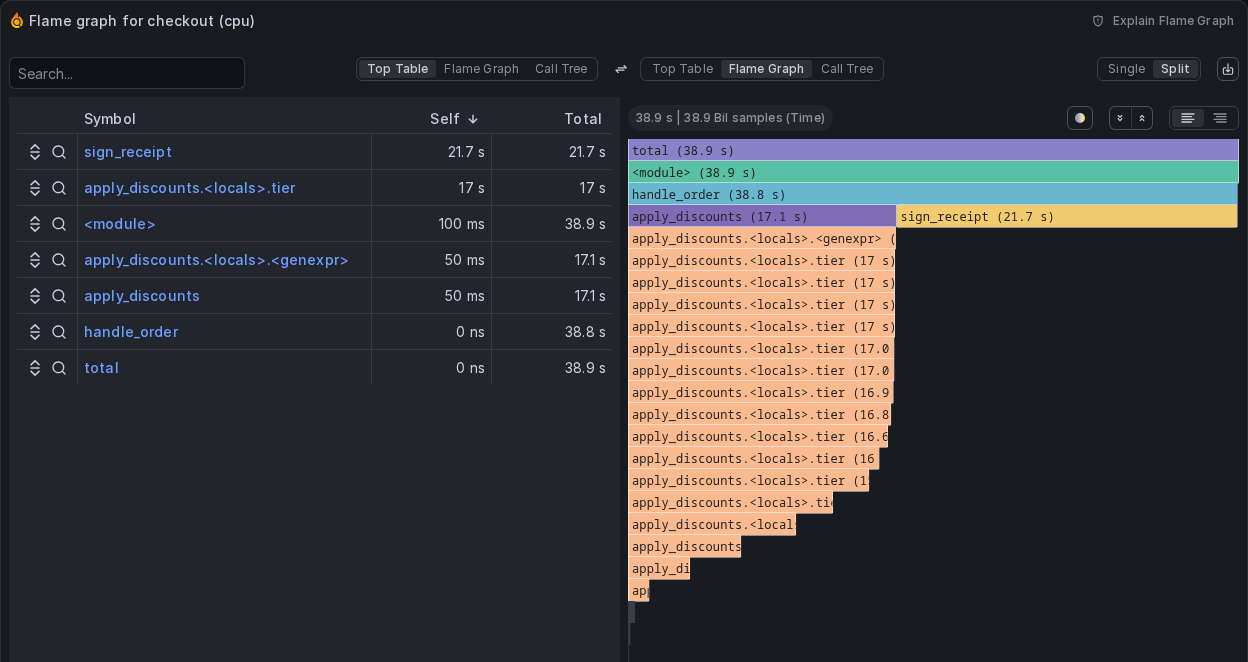
The other services in the list are the rest of the node: the control plane pods (etcd, kube-apiserver, coredns), the otel-lgtm components, the profiler itself, the containerd shims, and the processes that run outside any pod, which have no service.name and appear as unknown_service:kubelet and unknown_service:containerd. Pod processes carry k8s.namespace.name, k8s.deployment.name, and the rest of the attributes from k8s_attributes. Pyroscope keeps their dotted names, so filter with quoted labels such as {"k8s.namespace.name"="shop"}.
When you are done, delete the cluster, which removes everything this post created:
kind delete cluster --name otel-profiling
Limitations, and when not to do it this way
This setup is for learning and for local experiments, and a few of its choices do not carry over to production.
The profiler profiles every process on the node. It has no process, container, or namespace selection, and upstream has declined to add one. Keeping only some workloads means dropping the rest after k8s_attributes with the filter processor's profile_conditions. The otelcol-ebpf-profiler distribution does not include filter, so production setups either build their own distribution with it or relay through a gateway Collector that has it. Sampling cost on the node stays the same either way; only the exported volume shrinks.
otel-lgtm keeps everything in memory-backed volumes in a single container. It is a demo backend, and Grafana says so. For anything persistent, send profiles to a real Pyroscope deployment or to Grafana Cloud Profiles, which accepts OTLP profiles over gRPC.
The signal itself is Alpha. The OTLP profiles protocol is in Development, the profiling receiver is in Development, and the feature gate is alpha. Expect breaking changes between releases, which is why every image here is pinned and why the profiler and the backend's Collector are kept on the same version.
Let your coding agent do the setup
Most of the work in this post was not writing YAML. It was knowing which image version has which receiver key, that kind needs PID namespace translation, that batch does not support profiles, that memory_limiter percentages lie in a privileged pod, and which error message points at which of those. That knowledge changes with every profiler release.
The otel-profiles skill in our open source OllyGarden Agent Skills for OpenTelemetry packages exactly that. With it, a coding agent such as Claude Code, Cursor, or Codex can pick a consistent set of versions, detect a local cluster like kind and apply the right changes, validate the configuration against the pinned image before deploying, read the debug output to confirm data is flowing, and map an error string to its fix. It automates and validates most of the steps in this post, and it stays current as the profiler evolves.
Install all the skills with one command:
npx skills add https://github.com/ollygarden/opentelemetry-agent-skills
If the skills save you time, star the repository at github.com/ollygarden/opentelemetry-agent-skills, and open an issue when they get something wrong. That feedback is what keeps them accurate.